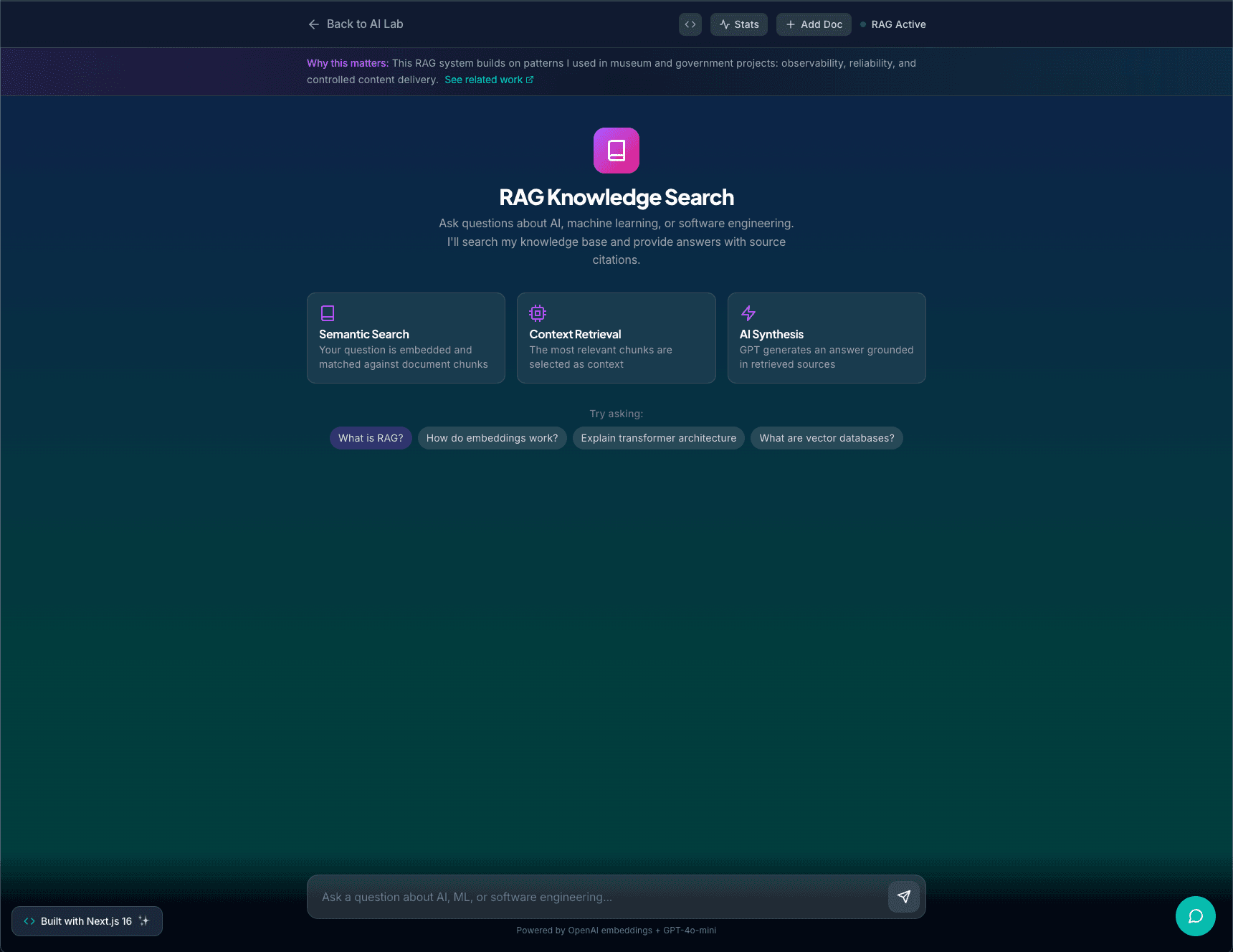
A streaming RAG powered knowledge search tool that lets users ingest their own documents, runs paragraph level embeddings, and returns grounded answers with source citations in real time. Built with OpenAI embeddings, GPT-4o-mini, a custom in-memory vector store, and a Next 16 API layer hardened with rate limits and basic abuse protections.
RAG Knowledge Search is a small AI lab project that I built to show what applied AI engineering looks like when it is treated as a real product instead of a toy.
It lets users:
Add their own documents into a knowledge base
Ask natural language questions about that content
Get streaming answers from GPT-4o-mini that are grounded in retrieved text
See which source chunks were used for each answer, with match scores
Under the hood it uses:
OpenAI text-embedding-3-small for embeddings
An in-memory vector store for similarity search (ready to swap for Pinecone or pgvector later)
A Next 16 API layer with shared state, chunking, and security constraints
A React-based chat UI that handles streaming and context visualization
This project lives at /ai/rag and powers the first tile in my AI lab.
Problem
Most AI demos show a model that answers questions out of thin air. That is fine for a quick prototype, but it is not how teams actually ship reliable AI features in production.
I wanted a small, end-to-end example that solves a more realistic problem:
Given a set of arbitrary documents, let a user ask questions and get answers that are grounded in those documents, with sources and safety limits, in a way that feels like a real product.
The constraints I set for myself:
No offline preprocessing step. The system should be able to ingest documents on demand.
Answers must be based on retrieved chunks, not free-form guessing.
The UI should feel fast and modern, including streaming.
The APIs should be structured and secure enough that I would be comfortable exposing them in a real app.
Approach
I split the project into four parts:
1. Knowledge store
A central module that tracks documents and their embedded chunks in memory. This isolates all retrieval logic from the API surface and the UI.
2. Ingestion pipeline
A dedicated endpoint that accepts a title and body text, validates input, chunks it into segments, embeds those segments, and stores them in the shared vector store.
3. Query and retrieval
An endpoint that embeds the user query, runs cosine similarity against all chunks (both default and user-provided), selects the top matches, and constructs an LLM prompt that includes the question and retrieved context.
4. Streaming chat UI
A React page that lets users ingest docs, see a list of what they have added, and talk to the system through a streaming chat interface. The UI tracks conversation history and highlights which source chunks were used.
Architecture
Frontend
/ai is the AI lab hub with project tiles.
/ai/rag is the main RAG interface, built with Next 16 and React 19.
The page is split into:
A document ingestion panel with title and content fields, character counters, and status messages
A list of user documents with basic metadata
A chat panel with message history and a side panel for active sources
AI responses stream token-by-token into the last assistant message for a natural feel.
Backend
All RAG logic lives under /api/ai/rag:
ragStore.ts
A shared module that holds docs and chunks in memory. This makes it easy to support both default knowledge and user-uploaded content, and gives me a clean seam for swapping in a real database or vector service later.
Splits the content into chunks using a simple paragraph and sentence-aware strategy capped at 800 characters per chunk
Calls OpenAI to embed each chunk with text-embedding-3-small
Stores the resulting vectors and metadata in the shared store
GET /api/ai/rag/docs
Returns the list of ingested documents associated with the current IP
Used purely for the UI list
POST /api/ai/rag/query
Validates the question text and length
Embeds the question
Runs cosine similarity across all available chunks (default and user)
Selects the top matches with scores
Builds a system prompt that instructs the model to stay grounded in the given context
Calls GPT-4o-mini with stream: true
Wraps the OpenAI stream in a ReadableStream and sends it back as text
Includes a X-RAG-Sources header with the selected sources and scores so the client can update the side panel immediately
Security and Robustness
This project is still a lab, but I treated the API like something that might be exposed to real users:
Rate limiting:
Each RAG route is limited per IP (roughly 20-30 requests per minute, adjustable) to prevent abuse.
Input validation:
Titles and content are length-limited. Questions are capped at a reasonable character count. Empty or malformed payloads are rejected early.
Per-IP document limits:
Each IP can only add a small number of documents into the in-memory store. This avoids unbounded growth and makes it harder to spam.
Origin checks and headers:
The RAG endpoints enforce origin constraints and add strict response headers through Next configuration.
This is not a full security appliance, but it already follows some good habits I would apply in a client context.
UX Details
Small UX choices help the project feel like something I would actually ship to a client:
Streaming responses give a fast-feedback feel, even when the model is still working.
The assistant message placeholder is created before the stream begins so the layout does not jump.
The sources panel updates as soon as the request begins, using metadata from the header.
Errors surface as clear inline messages near the form that triggered them.
The RAG lab is linked from both the AI hub and the global navigation so it is easy to discover.
What I Learned and Why It Matters
This project is small on purpose, but it captures most of what an AI engineer does in day-to-day work:
Building ingestion and chunking pipelines
Managing embeddings and vector search
Designing prompts that keep the model grounded in retrieved context
Handling streaming and incremental UI updates
Thinking about rate limits and abuse even in small demos
It also gives me a concrete, live example I can point to when talking about RAG, instead of hand-waving through it. Future work on this lab will involve swapping out the in-memory store for a persistent vector database and experimenting with lightweight evaluation of retrieval quality.
⭐ Lead at Personal Project
Prompt Injection & Safety Lab
An interactive CTF-style playground for testing prompt injection attacks and defenses. Seven challenges with increasing difficulty teach how attackers try to extract secrets from LLMs and how defenders can build more robust systems. Each level adds new protections, from basic instructions to output filtering and multi-layer sandboxing.